
Spendella / Knowledge base
Enable Android app PIN, biometrics and haptics
Protect opening the app on your phone and configure light vibration feedback.
This guide covers the free plan — setting it up yourself takes a minute.Get started free →
Updated 7 September 2026
Where to find it
- On the website
- Account security is in Settings → Security. This guide covers local Android options.
- On Android
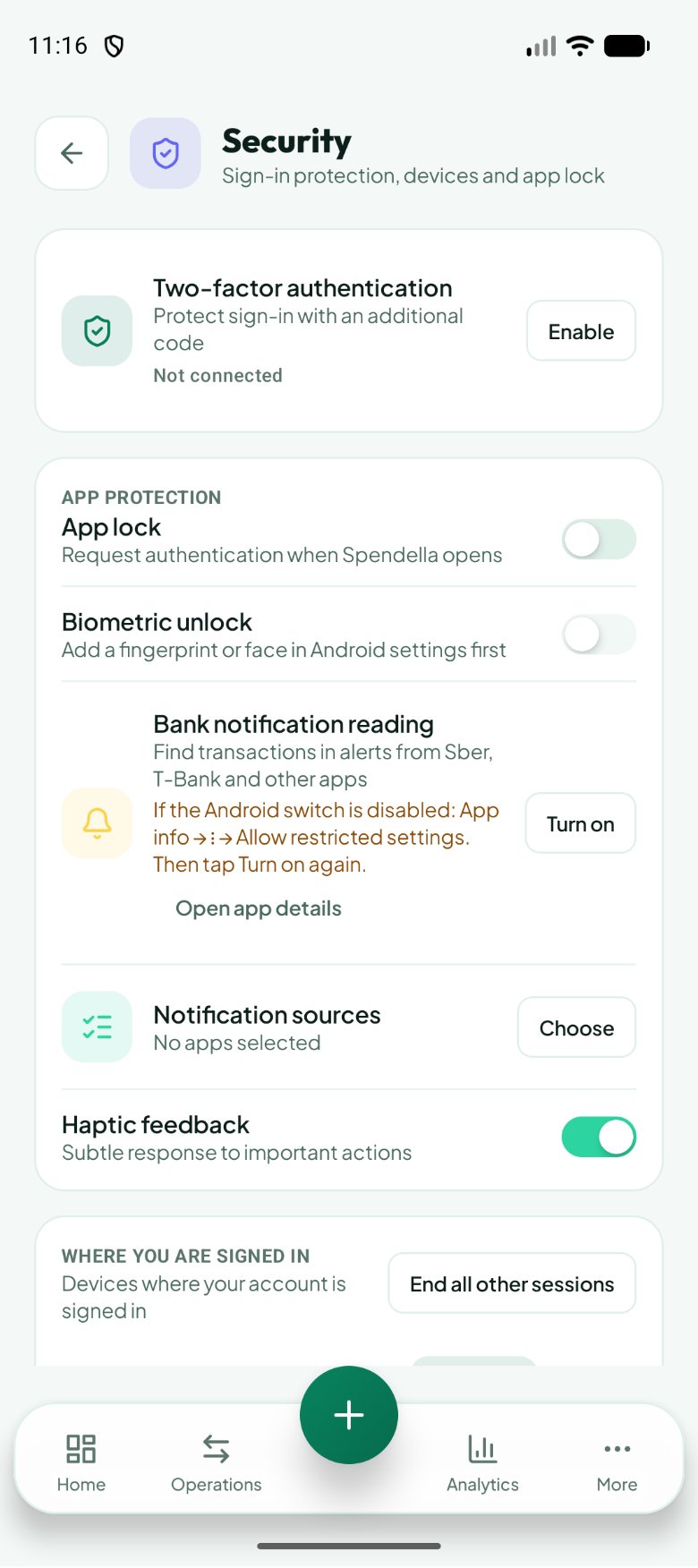
- More → Settings → Security.
Get started free and open this section Sign up in a minute, no card needed. This exact section opens right after.
01
Before you start
The app PIN is not your account password or two-factor code. It protects opening Spendella on this device. Biometrics uses fingerprints or face recognition already configured in Android.
02
What to do
- Open Security and enable app lock.
- Create a PIN and enter it again to confirm.
- For biometrics, first enrol a fingerprint or face in Android system settings, then enable biometrics in Spendella.
- Turn haptic feedback on or off as preferred.
- Close and reopen the app to check unlocking.
03
If something goes wrong
- Biometrics unavailable: check enrolment and device support in Android.
- No vibration: check system feedback settings. An emulator cannot physically vibrate.
- Do not clear app data merely to experiment with the PIN. First make sure you can sign into your account.
What you should see
Opening the app uses the selected local protection; feedback also depends on the device.
Try it yourself
Everything above is free.
No time limit, no card. Sign up and we open the section this guide is about.
Still need help?
Tell us which step you got stuck on. Support can help you work through it.
Contact support ↗Contact us without signing in